Basic Automation Dolphin {anty}
General information 📜
Browser profiles based on the "Anty" engine support launching with DevTools Protocol enabled. This allows you to connect to a profile through a port generated at startup and automate the browser using tools like Puppeteer, Playwright, Selenium, and others.
Basic automation includes three steps:
- Start a profile via API with DevTools Protocol enabled.
- Connect to the profile’s port using an automation tool (Puppeteer, Playwright, Selenium, Postman, etc.).
- Run your own automation script through the open connection.
ℹ️ To use Dolphin{anty} automation, the app must be running and authorized. Authorization can be done with login/password or programmatically via a token. You can create a token in your personal account.
Request parameters for token authorization:
To avoid a 401 error, you must send a request
Method: POST
URL: http://localhost:3001/v1.0/auth/login-with-token
Header: Content-Type: application/json
Body:
{ "token": "API_TOKEN"}
Replace API_TOKEN with your actual token from your Dolphin{anty} account on our site.
ChromeDriver ⬇️
ChromeDriver is the bridge between your script (e.g., Selenium) and the Dolphin{anty} browser. The standard driver can reveal automation, so we provide our own modified ChromeDriver for each browser version.
Examples of authorization request ⚙️
✅ If successful, the response will be:
{"success": true}
Step 1 — Start a profile via API ▶️
To start a browser profile via API, send a GET request:
http://localhost:3001/v1.0/browser_profiles/PROFILE_ID/start?automation=1
For headless mode:
http://localhost:3001/v1.0/browser_profiles/PROFILE_ID/start?automation=1&headless=1
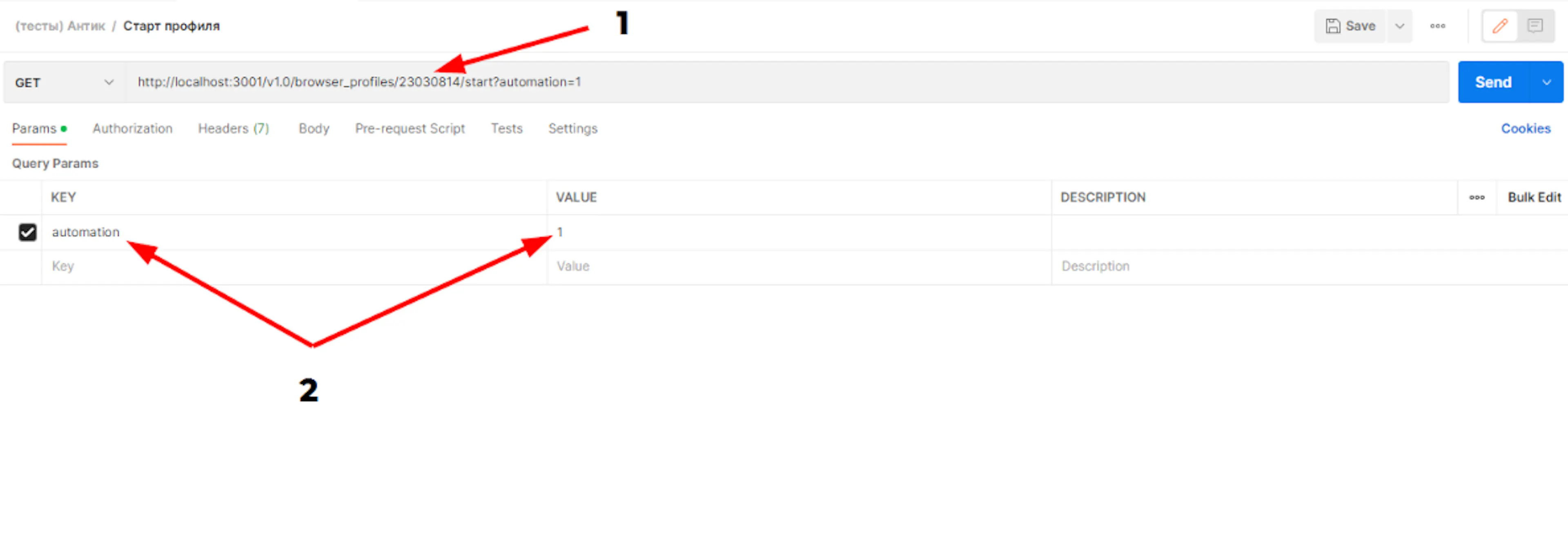
PROFILE_ID- the profile’s ID (you can get it via the API or in the Dolphin{anty} app when editing a profile).automation=1- required for automation.
Example of starting via Postman by sending a request:
⚠️ Important notes:
- Local API works only if Dolphin{anty} is running.
- Requests must be sent from the same machine where the browser runs.
- By default, the local API uses port 3001; if busy, another port is assigned (check in the Health window in Dolphin{anty}).
- On the Free plan, cookie import/export via API is not available due to no cloud sync.
- Request limits (rate limit): 1500 requests per minute
API Response ✅
If the profile was started successfully, the response will look approximately like this (the values of the port and wsEndpoint fields may vary):
{
"success": true,
"automation": {
"port": 50568,
"wsEndpoint": "/devtools/browser/c71c1a9d-f07c-4dd9-84a9-53a4c6df9969" }}
Step 2 — Connect to the profile 🔌
Puppeteer
Puppeteer — Popular Google library for browser UI automation and testing. Originally made for launching Chrome and verifying UI, but supports almost any browser actions. Requires JavaScript/Node.js knowledge.
Playwright

Playwright - A newer, modern alternative to Puppeteer by Microsoft with similar API and functionality.
Selenium
Connecting Selenium to a running browser is described in this article. It’s worth noting that Selenium uses the standard ChromeDriver, but websites can detect automation. Therefore, we recommend using our ChromeDriver — download it and specify its path in your code to hide Selenium usage.
Step 3 — Stop a profile ⛔️
To stop a browser profile via API, send a GET request:
http://localhost:3001/v1.0/browser_profiles/PROFILE_ID/stop