
Account switching in Dolphin {anty}
You can log into multiple accounts at the same time in Dolphin {anty} and easily switch between them — available on Base, Team, and Enterprise plans. It’s super handy for team workflows when you need to jump between members’ accounts, or if you use separate accounts for different tasks.
How does it work? 🤔
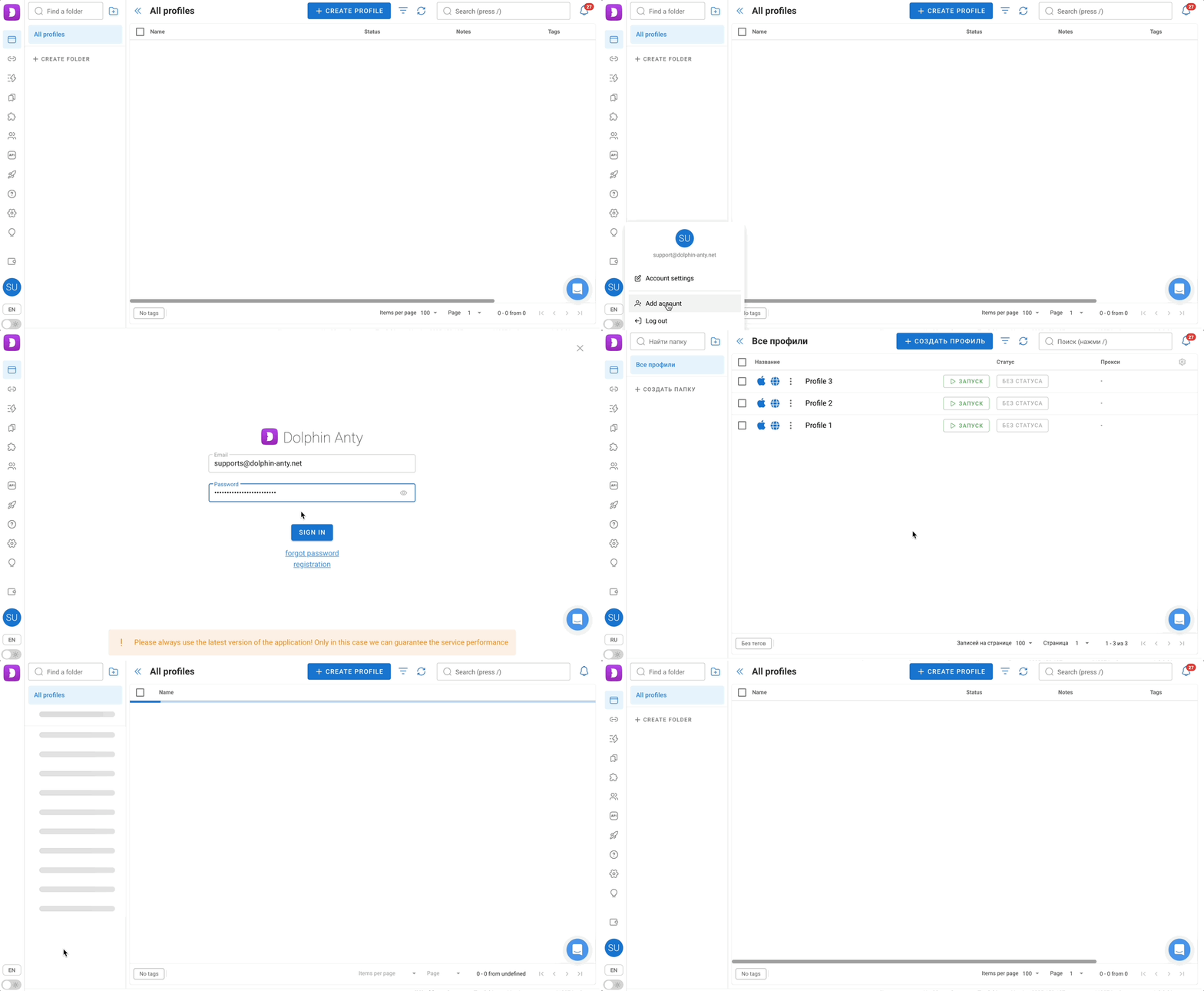
- Click the account icon in the bottom left corner, next to the interface language switcher
- Click “Add account”
- Log in through the window that appears
- You’ll be instantly logged into the newly added account
- Now, when you click the account icon, you’ll see all added accounts and can switch between them in one click ✨
How it looks ⬇️
ℹ️ Important:
- This feature is not available on Free and Free+ plans
- Each paid plan has a limit on how many additional logins are allowed
- Base allows 2 additional logins (total: 3)
- Team allows 3 additional logins (total: 4)
- Enterprise allows 10 additional logins (total: 11)
- If you try to add a second account while on Free or Free+, the system will show a warning that this feature is only available starting from the Base plan.
- For example, two Base accounts were logged in and one of them gets downgraded to Free, the system will automatically log out of all paid accounts and leave only the Free one active, since multi-account support isn’t available on Free.
Was this page helpful?