
Profile History
🙂 Introduction
If you've ever wondered "What proxies have I put on this profile before?" or "I need to remember what I write in notes" and the like - now you can easily find out 😉
To do this, find the profile of interest in the list of profiles and click "three dots" ⋮ next to its name, and then click "History".

After that a window will open in which you can get a little lost, so let's understand it in order
🤔 What can we watch ?

On the top three blocks:
-
⏳ Work Time is the total runtime in the profile, i.e. how long it has been open.
-
✅ Status - in this case "New", you can set any of the preset New\Ban\Ready or create your own status, also here you can see from what date this status is assigned.
-
⏯️ Number of profile launches - how many times the profile has been launched for the whole period of time.
Then comes the most delicious, it is the history itself, the actions/changes with the profile is recorded in a separate line where it is shown:
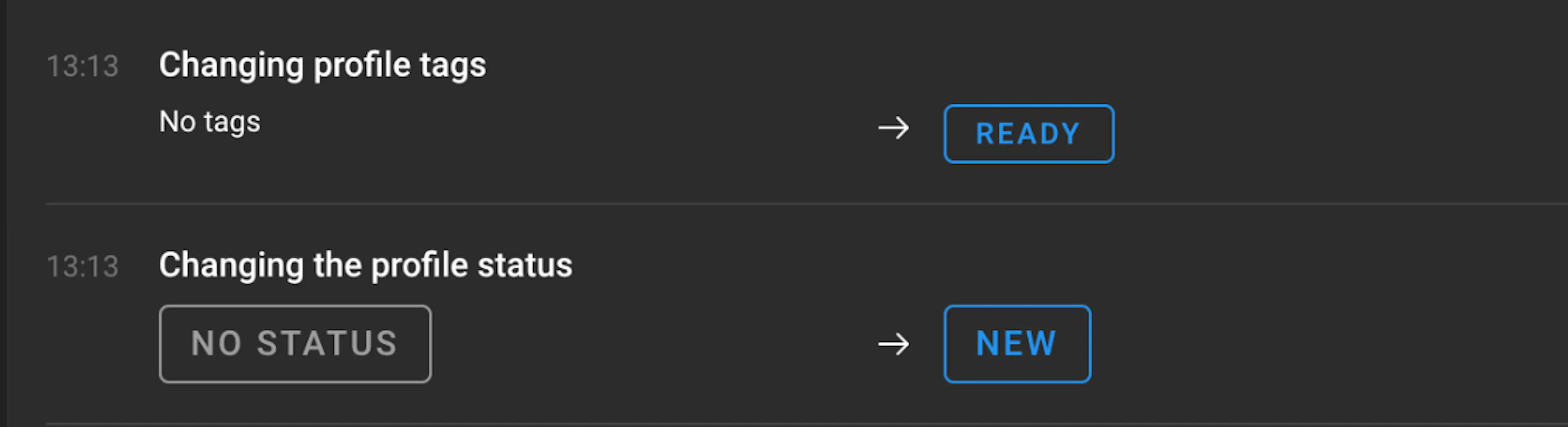
-
Action time ⏳
-
Above is exactly what was done 🤔
-
On the left is the value of "before" ️
-
On the right is the value "after" ️
Also, at the top of the window there is a useful thing - filters 📊, on them you can find certain actions on the desired users (if you have for example a team).
There are 3 parameters for this ⬇️
-
User - whose actions we are looking for, it is possible not to select if there are no other users or we are looking for all users
-
Action type - list of all recorded actions and selection of the one you want to find
-
Period - time frame for which to find the action
Example:

⏳ What is recorded in history ?
Now let's go through the list 📋 what exactly is recorded in the profile history, at the moment the list is like this, but it may expand and improve in the future 😉
-
Creating a profile
-
Profile launch
-
End of profile session
-
Cookie import
-
Exports of cukes
-
Profile change
-
Profile transferred
-
Changing access rights
-
Modifying/deleting a proxy profile
-
Changing/deleting profile status
-
Modifying/deleting profile tags
-
Modifying/deleting a profile note
Now you can always find out what happened to the profile. I wish you a pleasant use 😁